
Allergen management software for food manufacturers
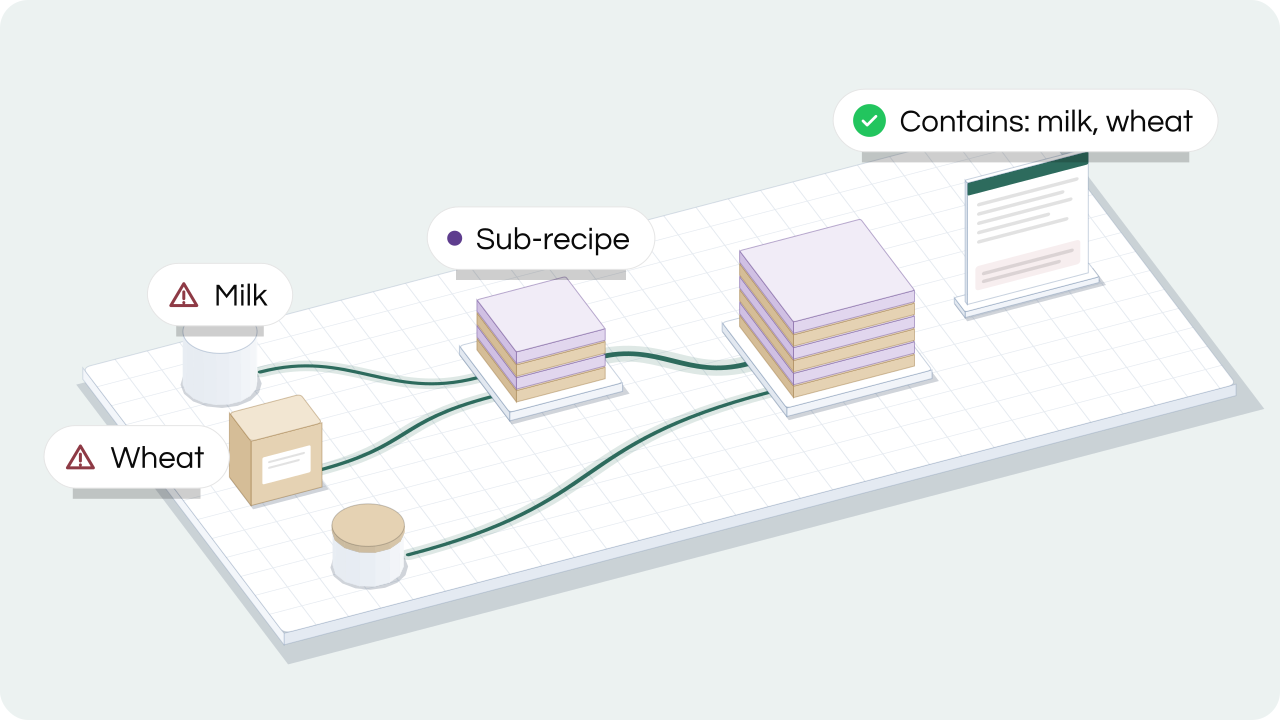
Set allergens once on each ingredient and NutraSoft carries them through every sub-recipe to the label, then finds every lot and customer an ingredient lot reached.
In short
NutraSoft is a cloud ERP for food and beverage manufacturers. It has 14 built-in allergens plus custom ones, rolls them up from ingredients through sub-recipes to each recipe, and writes Contains and May contain statements in English and French. Lot tracing finds every lot and customer an ingredient lot reached. On Enterprise, the Quality Control app records allergen monitoring, changeovers, deviations, CAPA and supplier approval.
Plans: Every plan. Allergen roll-up, Contains and May contain statements, ingredient declarations, Nutrition Facts and lot tracing are in both ERP plans, Food Manufacturing Software and Enterprise. Allergen monitoring points, allergen changeover records, deviations and CAPA, supplier approval, managed recalls and mock recall drills are in the Quality Control app, on Enterprise only.
What allergen management in NutraSoft includes
14 built-in allergens, plus your own
Set allergens on each ingredient from a built-in list, and add custom allergens for anything else you declare.
- The nine major US allergens
- Plus mustard, celery, sulphites, lupin and molluscs
- Custom allergens
- Banned countries recorded per ingredient
Roll-up through sub-recipes
Allergens set on an ingredient carry through every level of sub-recipe to the finished recipe.
- Nested sub-recipes, however deep
- Update an ingredient and every recipe that uses it reflects the change
- Edit history on every product and recipe: who changed what, when and from where
Statements and ingredient declarations
The words on the label come from the recipe, in English and French.
- Contains and May contain statements in English and French
- Ingredient declaration with English and French declared-as text
- Sugar grouping and merged sub-recipes
Nutrition Facts for Canada and the US
The same recipe feeds the Nutrition Facts table.
- 5 Canadian bilingual formats and 5 US formats
- Canada's front-of-package nutrition symbol
- Download as JPEG or SVG, or print
- 5,690 foods from the Canadian Nutrient File, plus your custom foods
Lot tracing to every customer
When an ingredient lot is the problem, find every lot and customer it reached.
- Forward and backward lot tracing on both ERP plans
- Trace as a graph, list or table, and save as PDF
- The Recall button lists every customer invoice that received a lot
- Managed recalls and mock recall drills in the Enterprise Quality Control app
Floor and supplier controls (Enterprise)
The Quality Control app keeps the records an allergen program runs on.
- Allergen monitoring points and allergen changeover records under prerequisite programs
- Deviations and CAPA
- Supplier approval per material, with documents and expiry dates
- Receiving can block unapproved suppliers
How allergen management works, step by step
- 1
Set allergens on ingredients
Pick each ingredient's allergens from the 14 built in, add custom allergens where you need them, and record any countries where an ingredient is banned.
- 2
Build recipes and sub-recipes
As you build a recipe from ingredients and nested sub-recipes, the allergens roll up to the recipe on their own.
- 3
Check the label text
Review the Contains and May contain statements and the ingredient declaration in English and French, then choose a Canadian or US Nutrition Facts format and download it as JPEG or SVG, or print it.
- 4
Produce with lot records
Production runs record which ingredient lots went into each batch, so every finished lot stays linked to its ingredient lots.
- 5
Record floor checks (Enterprise)
In the Quality Control app, record allergen changeovers and allergen monitoring checks, raise deviations and CAPA, and approve suppliers per material with their documents.
- 6
Trace when something goes wrong
If an ingredient lot turns out to carry an undeclared allergen, trace it forward to every finished lot, and the Recall button lists every customer invoice that received the affected lots.
How allergens roll up from ingredient to finished product
An allergen program starts with the ingredient. In NutraSoft you set allergens on each ingredient from 14 built-in allergens: the nine major US allergens (milk, eggs, fish, crustacean shellfish, tree nuts, peanuts, wheat, soy and sesame) plus mustard, celery, sulphites, lupin and molluscs. Custom allergens cover anything else your markets or customers ask you to declare.
From there, the recipe does the work. Allergens roll up from each ingredient through every level of nested sub-recipe to the finished recipe. A dough made with wheat flour and butter brings wheat and milk into every product that uses it, without anyone entering them again.
That matters most when something changes. Replace an ingredient with one that carries a new allergen, update the ingredient, and every recipe built on it reflects the change. The edit history on every product and recipe records who changed what, when and from where.
Each ingredient can also list the countries where it is banned, so the rule stays with the ingredient rather than in someone's memory.
Allergen statements, ingredient lists and Nutrition Facts from one recipe
A label has to agree with the recipe it describes. NutraSoft writes the label text from the recipe itself: Contains and May contain statements in English and French, and an ingredient declaration with English and French declared-as text, sugars grouped and sub-recipes merged where you choose.
The same recipe feeds the Nutrition Facts table. NutraSoft offers 5 Canadian bilingual formats and 5 US formats, plus Canada's front-of-package nutrition symbol, built on 5,690 foods from the Canadian Nutrient File and any custom foods you add. Values can be calculated per cooked weight, and each panel downloads as JPEG or SVG or prints directly.
When a recipe changes, the statements, the declaration and the panel come from the changed recipe, so the next label you produce reflects the reformulation.
One thing to watch: a statement is only as good as the ingredient data under it. Check supplier specifications when an ingredient or a supplier changes, and on Enterprise keep those documents, with their expiry dates, on the supplier's approval for that material.
Finding every lot and customer an ingredient lot reached
If a supplier tells you an ingredient lot carried an undeclared allergen, the questions are immediate: which finished lots used it, and who bought them?
Because production runs record usage per lot, NutraSoft answers from the records. Forward tracing follows the ingredient lot into every run and finished lot that used it; backward tracing goes the other way, from a finished lot to every input. You can view a trace as a graph, a list or a table and save it as a PDF. The Recall button then lists every customer invoice that received the affected lots. All of this is on both ERP plans.
On Enterprise, the Quality Control app adds managed recalls and mock recall drills. Affected lots are assembled automatically, a recall can freeze them, and you get a customer impact list and a notification log. Nothing is sent to customers automatically: your team decides who is contacted and when.
Running a mock recall on an allergen scenario is a practical way to test the whole chain before you need it.
Allergen controls in the plant and with suppliers (Enterprise)
Labels are one half of allergen control. The other half happens on the floor and at the dock, and that is where the Quality Control app on Enterprise comes in.
Under prerequisite programs, you set up allergen monitoring points and keep allergen changeover records, so each changeover between products is on record. A result that needs action can be raised as a deviation and worked through CAPA (corrective and preventive action) to closure. The QC-02 Non-Conformance by Program report shows where problems cluster.
Supplier approval is set per material, not only per supplier, with documents and their expiry dates. A supplier approved for packaging can stay unapproved for an allergen-bearing ingredient, and receiving can block unapproved suppliers or hold a lot for QC. System Alerts on the dashboard flag expired documents.
Allergen management: questions answered
What is allergen management software?
Allergen management software tracks which allergens each ingredient carries, carries them into every recipe that uses the ingredient, and produces the allergen statements for the label. In NutraSoft it also traces any ingredient lot to every finished lot and customer it reached, and on Enterprise it records allergen changeovers, monitoring, deviations and CAPA.
Which allergens are built in?
Fourteen: the nine major US allergens (milk, eggs, fish, crustacean shellfish, tree nuts, peanuts, wheat, soy and sesame) plus mustard, celery, sulphites, lupin and molluscs. You can add custom allergens for anything else you declare.
Do allergens carry through sub-recipes?
Yes. Allergens set on an ingredient roll up through every level of nested sub-recipe to the finished recipe, so a sub-recipe's allergens appear on every product that uses it.
Does NutraSoft write bilingual allergen statements?
Yes. It produces Contains and May contain statements in English and French, along with an ingredient declaration with English and French declared-as text. Nutrition Facts come in 5 Canadian bilingual formats and 5 US formats.
How do I find every customer who received product made with an ingredient lot?
Trace the ingredient lot forward. NutraSoft follows it into every finished lot that used it, and the Recall button lists every customer invoice that received those lots. Lot tracing is on both ERP plans; managed recalls and mock recall drills are in the Quality Control app on Enterprise.
Which NutraSoft plan includes allergen management?
Both ERP plans include allergen roll-up, bilingual statements, ingredient declarations, Nutrition Facts and lot tracing. Allergen monitoring points, changeover records, deviations and CAPA, and supplier approval per material are in the Quality Control app, which comes with Enterprise. The 14-day free trial includes Enterprise features except the API.
Why not manage allergens in a spreadsheet?
A spreadsheet only knows what someone typed into it. In NutraSoft, allergens live on the ingredient and roll up through every sub-recipe on their own, the label text comes from the recipe, and lot records link every finished lot to the ingredient lots inside it. When an ingredient changes or a lot is in question, the answer comes from the records, not from checking copies of a file.
Keep exploring
Allergen Management is one part of NutraSoft's food manufacturing software, which runs the whole plant in one system. See all 22 features, how it compares or pricing.
Related features
Who uses it
Terms explained
Free resources
See it on your own products
Book a demo and we will walk through your recipes, lots and orders in NutraSoft, or start a 14-day free trial.
Keep exploring: