
Catch weight software for meat, seafood and cheese
Weigh every piece on the production run, label every piece and case, and carry the real weight into sales orders, shipping and counts.
In short
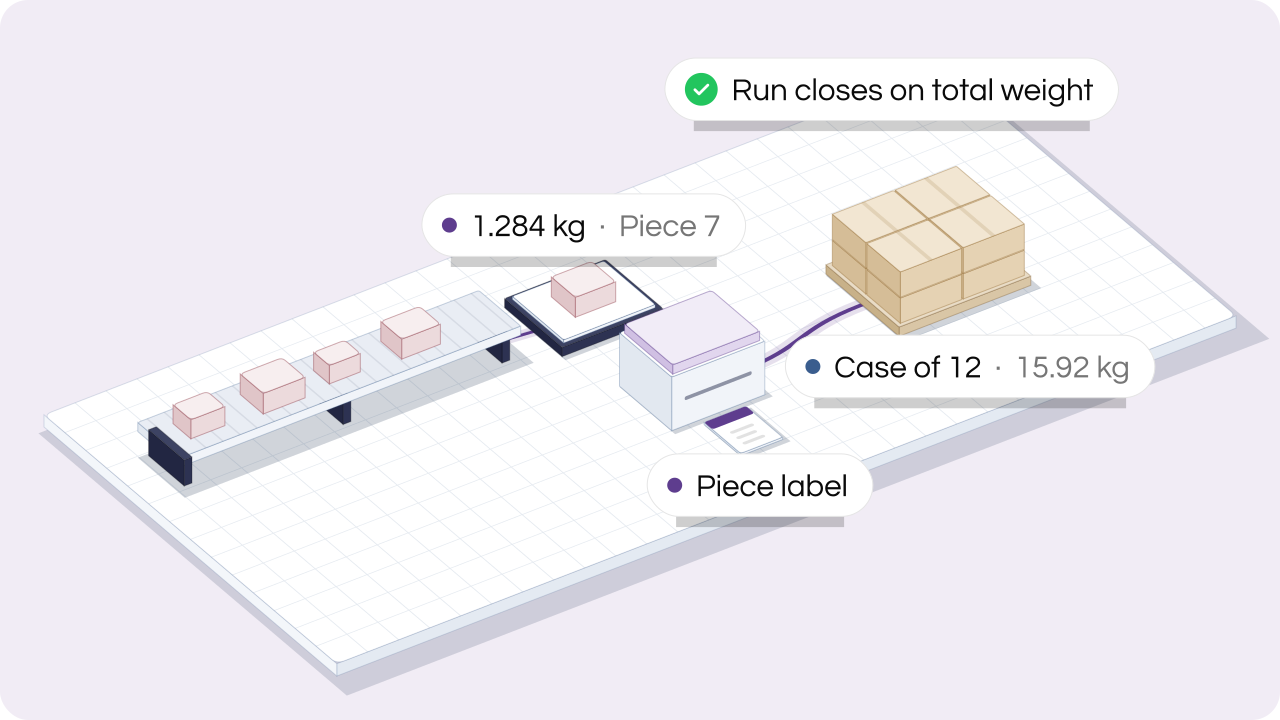
NutraSoft is a cloud ERP for food and beverage manufacturers, and it handles catch weight on both ERP plans. Pieces are weighed on the production run by typing the weight, with a keyboard-wedge scale, or with a serial scale connected through the browser. Piece and case labels print as you go, the run closes on the summed weight, and the cases flow into sales orders, shipping and counts.
Plans: Food Manufacturing and Enterprise. Catch weight is included in both ERP plans, Food Manufacturing Software and Enterprise, piece and case labels included. Encoding the net weight in a GS1 barcode with the Label Designer is Enterprise only.
What catch weight in NutraSoft includes
Weighing on the production run
Capture each piece's weight where it is made, as part of the run.
- Type the weight, or use a keyboard-wedge scale
- Connect a serial scale through the browser (Web Serial in Chrome or Edge)
- Set the number of pieces per case
- Void a piece with a reason
Piece and case labels
Every weighed piece and every case gets its own label, on both ERP plans.
- Piece and case labels print on both ERP plans
- GS1-128 lot labels with product code, expiry and lot
- On Enterprise, the Label Designer can encode net weight with GS1 application identifier 3103
- Label Designer output as PDF, PNG or Zebra ZPL (Enterprise)
Stock at the real weight
The run closes on the summed weight of the pieces, so the output lot carries what you actually made.
- Run closes on the total of the weighed pieces
- Output lot numbered from your lot template
- Cost updated and posted to the ledger when the run closes
- Forward and backward lot tracing
Cases into orders and shipping
Catch-weight cases move through sales the way they were packed.
- Sales orders take catch-weight case quantities
- Scan the case labels at shipping
- FEFO suggests the earliest-expiring lots first
- Confirming the shipment creates the invoice with the lot on every line
Counts by case label
Count stock by scanning the labels already on the cases.
- Scan catch-weight case labels during counts
- Also scan GS1-128 lot labels, product barcodes and lot numbers
- Count several warehouses at once
On the floor app
Operators weigh pieces and print labels from the NutraSoft floor app.
- Android phones and tablets
- A browser version for Windows floor tablets
- Camera barcode scanning
- Shipping and pick & pack in the same app
How catch weight works, step by step
- 1
Set up the weighing
Set how many pieces make a case and connect the scale. A keyboard-wedge scale types the reading like a keyboard; a serial scale connects through the browser in Chrome or Edge.
- 2
Weigh each piece
On the production run, weigh each piece by typing the weight or reading it from the scale. A piece weighed by mistake is voided with a reason.
- 3
Print the labels
Print a label for each piece and each case as you go, from the ERP or the floor app.
- 4
Close the run
Close the run on the summed weight. The output lot enters stock at that weight, cost updates and the run posts to the ledger.
- 5
Sell and ship by the case
Enter catch-weight case quantities on sales orders. At shipping, scan the case labels, then confirm the shipment to create the invoice with the lot on every line.
- 6
Count by scanning
During a count, scan the catch-weight case labels instead of keying in each case by hand.
What catch weight software has to do
Catch weight products are sold by what each piece actually weighs: a pork loin, a side of salmon, a wheel of cheese. Two pieces of the same product never weigh the same, so a nominal weight on the product record is wrong for almost every piece you make.
That small difference adds up. Stock on hand drifts from what is really in the cooler, cost per kilogram is worked out on weight that does not exist, and packers fill cases over target to stay safe. The gap usually stays invisible until a count or a year-end review.
Catch weight software closes the gap by capturing the real weight at the point of production and carrying it forward: onto the label, into stock, and through to the cases you sell and ship. That is how NutraSoft handles it.
If giveaway is the problem you are chasing, our playbook, How to cut catch-weight giveaway, walks through eight steps meat processors use to bring it down, with a calculator that estimates what overpacking costs you today.
How weighing works on a NutraSoft production run
Weighing happens on the production run itself, so every piece belongs to the run's output from the moment it is weighed. NutraSoft takes the weight three ways: typed in by the operator, sent by a keyboard-wedge scale that types the reading into the field, or read from a serial scale connected through the browser with Web Serial, which works in Chrome and Edge.
You set the number of pieces per case. Each piece and each case gets its own label. If a piece is weighed wrong, dropped or pulled for quality, the operator voids it with a reason and it no longer counts toward the total.
When the run closes, it closes on the summed weight of the pieces rather than a planned quantity. The output lot carries that weight, cost updates and the run posts to the ledger.
Operators can do the same work on the NutraSoft floor app, which runs on Android phones and tablets and in the browser on Windows floor tablets. It weighs pieces and prints labels too, alongside production usage, receiving, counts and shipping.
From weighed case to shipped order
Catch-weight cases do not stop at the production floor. Sales orders take catch-weight case quantities, so customers order the way the product is packed.
At shipping, staff scan the labels of the cases going out. FEFO suggests the earliest-expiring lots first, and lots on hold, in quarantine or rejected are refused. Confirming the shipment creates the invoice with the lot on every line, takes the stock out, posts to the ledger and, if you use it, syncs to QuickBooks Online.
Counts work the same way. Scan the catch-weight case labels during a count instead of keying in each case, alongside GS1-128 lot labels, product barcodes and lot numbers. Several warehouses can be counted at once.
Because every case carries its lot, forward and backward lot tracing connects the ingredient lots used on a run to the customer invoices that received its cases, and the Recall button lists every one of those invoices.
Catch weight labels and GS1 barcodes
Piece and case labels print on both ERP plans, as do standard 2 by 4 inch lot labels and GS1-128 lot labels carrying the product code, expiry and lot.
On Enterprise, the Label Designer goes further. You design labels by drag and drop, bound to ERP data, and it can encode the net weight with GS1 application identifier 3103, the identifier for net weight in kilograms with three decimals. It prints Code 128, GS1-128, EAN-13, UPC-A, ITF-14, QR and GS1 DataMatrix among others, and outputs PDF, PNG or Zebra ZPL for thermal printers.
Two things to settle before you start: whether your customers need the weight inside the barcode or only printed on the label, and which scale you will use. A keyboard-wedge scale types the weight into the field like a keyboard; a serial scale connects through Web Serial in Chrome or Edge.
Catch weight: questions answered
What is catch weight software?
Catch weight software records the actual weight of each piece of a variable-weight product, such as meat, seafood or cheese, and uses that weight in stock and on labels instead of a nominal weight. In NutraSoft, pieces are weighed on the production run and the run closes on their summed weight.
Which scales work with NutraSoft?
NutraSoft reads the weight from a keyboard-wedge scale or from a serial scale connected through the browser (Web Serial in Chrome or Edge), and operators can also type the weight in. The floor app weighs pieces too.
Can the barcode carry the weight?
Yes, on Enterprise. The Label Designer can encode the net weight with GS1 application identifier 3103. Piece and case labels print on both ERP plans.
How do catch-weight cases move through orders and shipping?
Sales orders take catch-weight case quantities. At shipping, you scan the case labels, and confirming the shipment creates the invoice with the lot on every line.
Can operators weigh pieces on a tablet?
Yes. The NutraSoft floor app weighs pieces and prints labels on Android phones and tablets, and a browser version runs on Windows floor tablets.
Which NutraSoft plan includes catch weight?
Both ERP plans include catch weight: Food Manufacturing Software and Enterprise. Weighing, voiding pieces, piece and case labels, case quantities on sales orders and case scanning at shipping and counts are on both. Encoding the net weight with the Label Designer is Enterprise only.
Why not track catch weights in a spreadsheet?
Because a spreadsheet gets the weights after the fact and nothing else reads them. In NutraSoft the weight is captured on the run, the run closes on the summed weight, and the same cases are scanned at shipping and counts. Stock and lot records carry the real weight, and the cases you ship are the cases you weighed.
Keep exploring
Catch Weight is one part of NutraSoft's food manufacturing software, which runs the whole plant in one system. See all 22 features, how it compares or pricing.
Related features
Terms explained
Free resources
See it on your own products
Book a demo and we will walk through your recipes, lots and orders in NutraSoft, or start a 14-day free trial.
Keep exploring: