
B2B ordering portal for food manufacturers
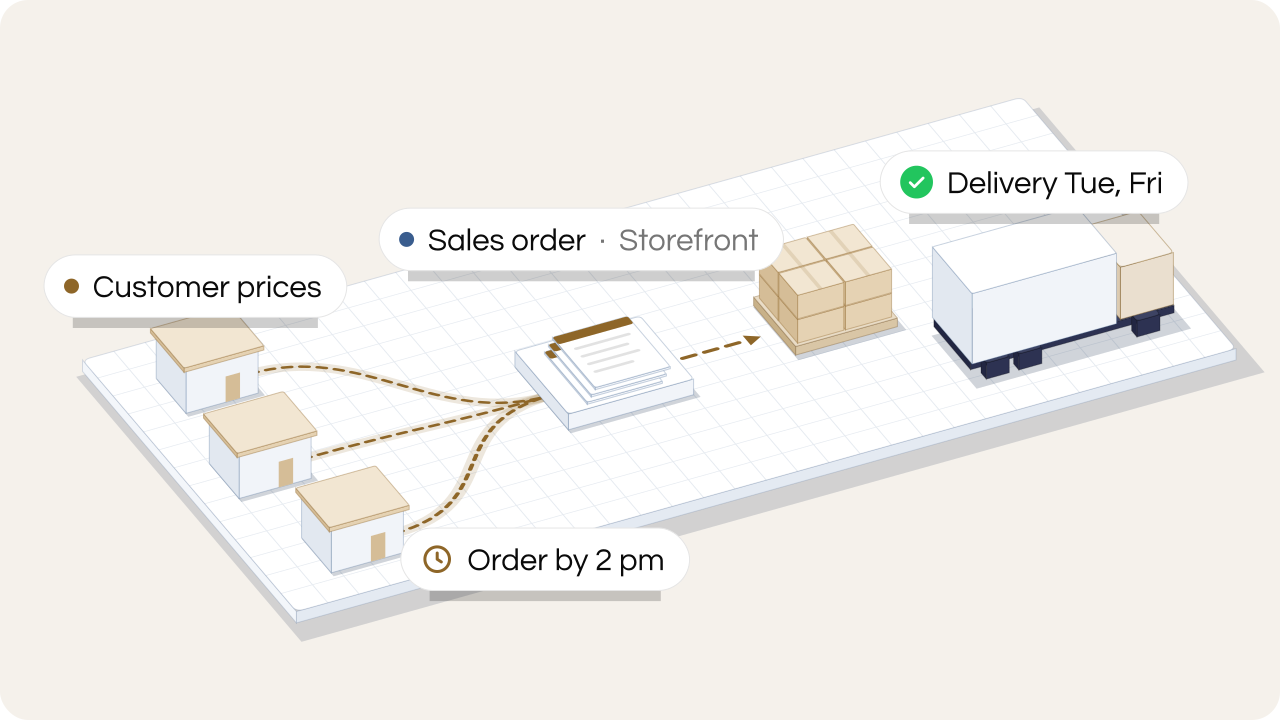
Your wholesale customers order online at their own prices, inside your cutoffs and delivery days. Each order lands in NutraSoft as a sales order, ready to pick, ship and invoice.
In short
NutraSoft's B2B ordering portal is an invite-only ordering site for your wholesale customers, branded with your logo, colours and fonts. Each customer sees the products you publish at their own price-list prices and orders within your cutoffs, delivery days and quantity limits. Customers on account skip card payment; others pay by card. Every order arrives in NutraSoft as a sales order, ready to pick, ship and invoice.
Plans: Food Manufacturing and Enterprise. The B2B ordering portal is included in both ERP plans, Food Manufacturing Software and Enterprise, and in the 14-day free trial. Enterprise adds the 3D warehouse map to guide pick routes.
What the B2B ordering portal includes
Your brand, your invite list
A private ordering site for the wholesale customers you invite, styled to look like your business.
- Your logo, colours, fonts and banner
- 29 colour presets to start from
- A launch checklist, then a go-live switch when you are ready
Each customer's catalogue and prices
You choose which products go online, and every customer sees their own prices.
- Publish only the products you want customers to order
- Show all published products, or only those on the customer's price list
- Each customer sees their own prices
- Optional on-hand stock display
Ordering rules for your delivery week
Customers order inside the windows and delivery days you work to.
- Order windows and cutoffs
- The weekdays you deliver
- A deadline for customers to cancel their own orders
- Minimum and maximum quantities per order
Checkout on account or by card
Customers add a shipping address and notes, then check out the way you set for them.
- Customers on account skip card payment
- Card payments with Canadian bank onboarding
- Refunds when an order is cancelled
- Transaction and payout history
Orders straight into the ERP
Each order arrives as a sales order marked Storefront, with the customer's prices already on it.
- No retyping from email or phone
- FEFO lot suggestions when you ship
- An invoice with the lot on every line
- Customers see their order history and invoices
See how the portal performs
Know what your customers order online and how the portal is doing.
- Storefront performance dashboard
- SAL-10 Storefront / Online Orders report with filters
- Export to CSV, Excel or PDF
How the B2B ordering portal works, step by step
- 1
Brand the portal
Add your logo, banner and fonts, pick one of 29 colour presets or set your own colours, and work through the launch checklist.
- 2
Publish products and prices
Choose the products customers can order. Each customer sees their own price-list prices, either on every published product or only on the products in their price list.
- 3
Set your ordering rules
Set order windows and cutoffs, the weekdays you deliver, the self-cancel deadline and minimum and maximum quantities per order. Decide which customers order on account and which pay by card.
- 4
Go live and invite customers
Flip the go-live switch and invite your wholesale customers. They pick products, add a shipping address and notes, and check out.
- 5
Pick, ship and invoice
Orders land as sales orders marked Storefront. Ship them with FEFO lot suggestions; confirming the shipment creates the invoice with the lot on every line, takes the stock out and posts to the ledger.
- 6
Track results
Follow the storefront performance dashboard and run SAL-10 Storefront / Online Orders. Customers look up their own order history and invoices on the portal.
Why move wholesale orders off email and the phone
Orders that arrive by email, phone or text have to be retyped. Someone checks the customer's price, works out which delivery day the order belongs to, and calls back when a quantity looks wrong or the order came in after the cutoff. Each of those steps is a chance to key in the wrong product or the wrong price.
With the NutraSoft portal, the customer does the entry. They see only the products you published, at their own prices, and the portal holds them to your order windows, cutoffs, delivery weekdays and quantity limits. The order arrives in the ERP as a sales order marked Storefront, so your team reviews and ships instead of typing.
Customers also see their order history and invoices on the portal, so they can look up a past order or an invoice without calling you.
What happens after a portal order comes in
A portal order follows the same path as any other sales order in NutraSoft. When you ship it, FEFO fills in the earliest-expiring lots first, and lots on hold, in quarantine or rejected are refused. Pick & Pack gives your picker a guided list in walking order, and packing slips show lots and locations. On a busy delivery day you can ship all orders in bulk.
Confirming the shipment creates the invoice with the lot on every line, takes the stock out, posts to the ledger and syncs to QuickBooks Online if you use it. Because the lot is on the invoice, forward and backward lot tracing reaches the customer, and the Recall button lists every customer invoice that received a lot.
Card payments, accounts and cancellations
You decide how each customer pays. Customers on account check out without a card and are invoiced when you ship, the same as any other sales order. Everyone else pays by card at checkout.
Card-paid and on-account orders arrive in NutraSoft the same way, as sales orders marked Storefront, so your shipping team handles them alike. Card payments are set up with Canadian bank onboarding. When an order is cancelled, the card payment is refunded, and the portal keeps a history of every transaction and every payout.
Customers can cancel their own orders up to the self-cancel deadline you set; after that, a cancellation goes through your team. Checkout also takes a shipping address and notes, so delivery instructions arrive with the order instead of in a separate email.
B2B ordering portal: questions answered
What is a B2B ordering portal?
A B2B ordering portal is a private website where your wholesale customers place their own orders at the prices you agreed with them. In NutraSoft, the portal is invite-only, carries your logo and colours, and sends every order into the ERP as a sales order, ready to pick, ship and invoice.
Which NutraSoft plans include the B2B ordering portal?
Both ERP plans: Food Manufacturing Software ($99 CAD per user per month, or $85 billed yearly) and Enterprise ($190 CAD per user per month, or $160 billed yearly). You can try it during the 14-day free trial. The Nutrition Analysis plan is a separate labelling app and does not include it.
How is a portal better than taking orders by email, phone or spreadsheet?
Orders by email, phone or spreadsheet have to be retyped, and the price, delivery day and cutoff are checked by hand. On the portal the customer enters the order, sees their own prices and orders inside your order windows, cutoffs and quantity limits. The order arrives as a sales order, so nothing is keyed in twice.
Customers can also look up their order history and invoices themselves instead of calling or emailing you.
Does each customer see their own prices?
Yes. Each customer sees their own prices, from the price lists you already keep in NutraSoft. You choose whether customers see every product you published or only the products on their price list, and you can switch on the on-hand stock display if you want customers to see what is available.
Can customers pay by card, or stay on account?
Both. Customers you put on account skip card payment and are invoiced when you ship. Other customers pay by card at checkout. Card payments work with Canadian bank onboarding, card payments on cancelled orders are refunded, and you can see every transaction and payout.
Can I control order cutoffs and delivery days?
Yes. You set order windows and cutoffs, the weekdays you deliver, a deadline after which customers can no longer cancel their own orders, and minimum and maximum quantities per order.
How is the portal different from the Shopify integration?
The Shopify integration connects your Shopify store: Shopify orders import as sales orders, fulfilment and tracking go back to Shopify, and product details and stock quantities go to Shopify. The B2B ordering portal is for the wholesale customers you invite: they order at their own prices, inside your cutoffs and delivery days.
Orders from both arrive in NutraSoft as sales orders and ship the same way.
Keep exploring
B2B Ordering Portal is one part of NutraSoft's food manufacturing software, which runs the whole plant in one system. See all 22 features, how it compares or pricing.
Related features
See it on your own products
Book a demo and we will walk through your recipes, lots and orders in NutraSoft, or start a 14-day free trial.
Keep exploring: